An escape room for kids at home works best when the phone is the referee, not the whole playground. For a 30-minute birthday game, use four short puzzles around one simple mission, let children move between physical clues, and enter each answer into a virtual lock. The phone confirms progress and reveals the ending; the room, story and teamwork provide the fun.
- 🚀 Four puzzles are enough — one search, one sorting task, one movement clue and one final code make a complete 25- to 35-minute game.
- 🧒 Age changes the clue, not the story — younger players need pictures and counting; older players can handle ciphers and parallel tasks.
- 📱 One shared phone beats one phone per child — it keeps the group talking and limits the screen to brief answer checks.
- 🛟 A fair game always has an exit — prepare two hints per puzzle and never make children climb, move furniture or enter a genuinely locked space.
Start with the flow, not the props
The most common planning mistake is buying little locks, boxes and invisible-ink pens before deciding what players are trying to achieve. Start with a single sentence: “Restore the space station before the oxygen timer reaches zero.” Every clue should either reveal an answer, point to the next object or advance that mission.
That focus matters more for children than elaborate decoration. In three Reddit discussions about home-built games for children aged roughly eight to eleven, organisers repeatedly described the same failures: too many simultaneous pathways, unclear search boundaries, puzzles that adults considered obvious, and children trying to force boxes or move furniture. Those are useful field signals, not scientific findings, but they point to a sound design rule: reduce ambiguity before increasing difficulty.
I would rather run a four-step trail that every child finishes with one well-timed hint than an eight-puzzle masterpiece that stalls after ten minutes. A good virtual lock is a promise that a reveal is waiting; it should not become a test of whether players guessed the designer's private logic.
Use the table below as a starting point, then adjust for the children you know. Reading confidence, familiarity with puzzles and group dynamics matter more than a birthday alone.
| Player age | Good first mechanic | Reading load | Suggested chain | Host role |
|---|---|---|---|---|
| 6, 7 | Colors, matching, counting visible objects | Very low | 2, 3 locks | Read the story aloud and offer choices |
| 8, 10 | Numeric, direction, simple picture cipher | Short sentences | 3, 4 locks | Give a hint after 3, 4 minutes of no progress |
| 11, 13 | Pattern, password, switches, short substitution cipher | Moderate | 4, 5 locks | Let two pairs solve parallel clues |
| Mixed ages | Observation first, numeric finale | Mixed | 4 locks | Assign roles so each age contributes |
SOURCE : Practical starting ranges based on puzzle complexity; adapt after a short playtest.
For a mixed group, assign rotating jobs: clue reader, object finder, code keeper and phone operator. Rotate after every solved lock. This prevents the fastest reader from taking over and gives a younger child a real contribution. If you have more than eight players, split them into two teams with identical clue sets or two short branches that meet at the final code. Do not put eight children around one tiny clue card.
The phone can stay communal. Lock Challenge supports numeric, direction, pattern, colors, switches, musical, map and GPS mechanics, plus chains that reveal the next step. For this indoor game, avoid GPS and use mechanics that match what children are already looking for. A count should open a numeric lock; a route should open a directional lock. Choosing a flashier interface that does not fit the clue only adds friction.
Build this 30-minute space-rescue mission
Here is a complete escape room you can copy. It uses household paper props, four virtual locks and one shared phone. The objective is to recover a three-digit launch code and reveal a congratulations message. Setup takes about 20 minutes the first time and much less when you reuse the structure.
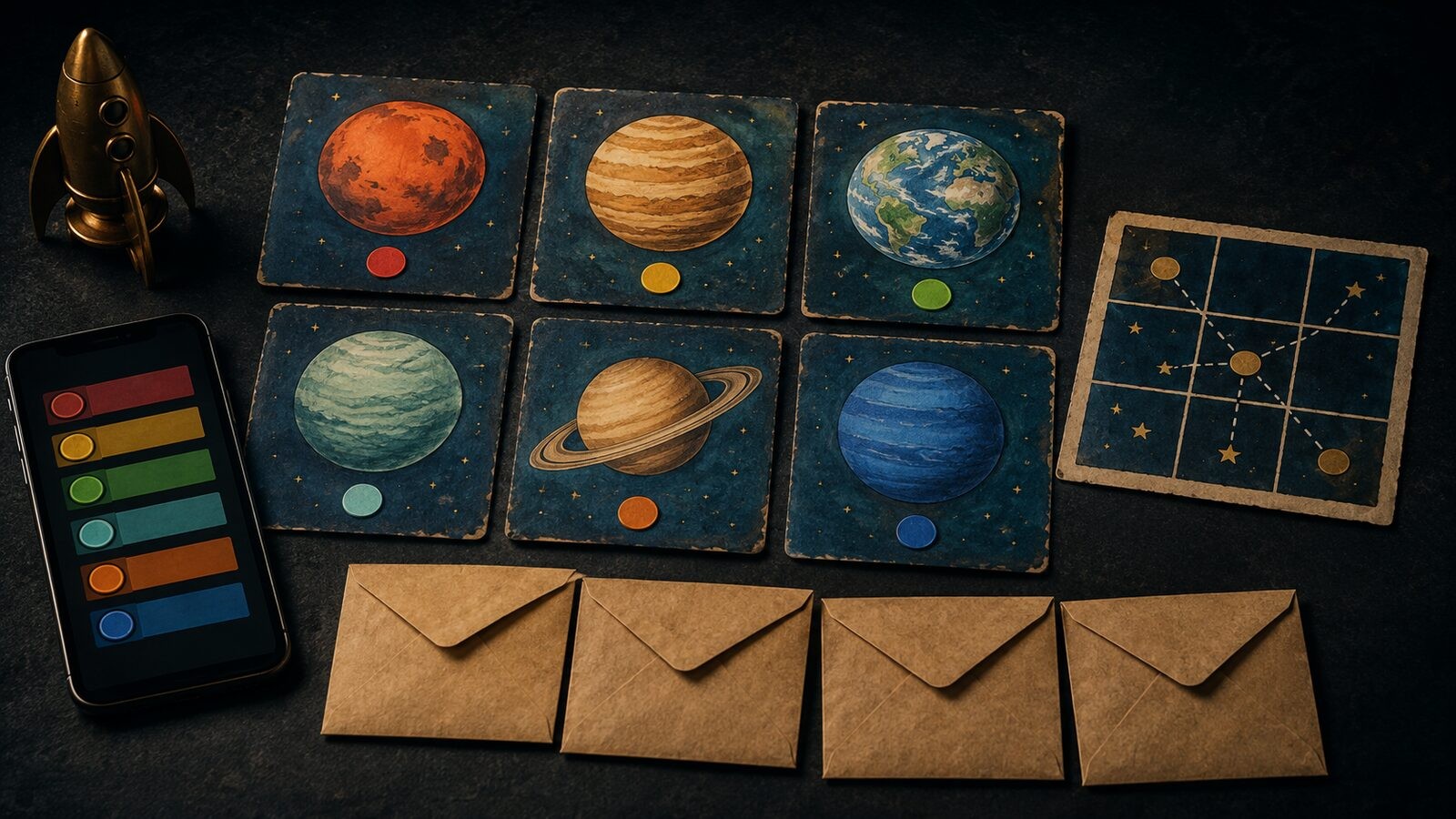
What you need: four envelopes, six paper “planet cards,” a marker, tape, one printed or hand-drawn 3×3 grid, and a phone with the lock chain open. Keep every hiding place below adult shoulder height and away from medicine, tools, kitchens, stairs and breakable objects.
Lock 1: count the emergency beacons
Place six planet cards around one clearly bounded room. Draw a red beacon on four cards and a blue beacon on two. The mission card says: “Find all six planets. How many carry a red emergency beacon?”
The answer is 4, entered into a numeric lock. When it opens, reveal: “Good. Navigation is online. Take the planets to Mission Control.” Also reveal the location of Envelope 2.
Why it works: every child can search, the instruction states exactly how many objects exist, and the lock verifies one unambiguous result. For six- or seven-year-olds, keep every card partly visible. For older players, add decoy drawings but never extra cards that look collectible.
Hint 1: “Have you checked all four sides of the room?”
Hint 2: “You need six planet cards before you count the red marks.”
Lock 2: sort the planets into a route
Number the six cards on the back. On the front, draw planet sizes from smallest to largest. Envelope 2 says: “Arrange the planets from smallest to largest. Read the first four numbers on the back.” Design the backs so the ordered digits are 2-7-4-1.
Enter 2741 into the second numeric lock. Its reveal says: “Route confirmed. Face the launch window and follow the commander's flight path.” It points to the 3×3 grid taped to a wall.
For ages 11, 13, replace size sorting with a short A1Z26 message. Keep the decoder on the same page; the challenge should be applying the key, not knowing that a key exists. The site’s guide to escape room clues by puzzle type has more cipher, observation and sequencing formats if you want to swap this step.
Lock 3: trace the flight path
Draw a start star in the center of the grid. Add arrows on a mission card: up, right, down, down, left. Children trace the path together and enter the same sequence into a directional lock.
When it opens, reveal: “The ship is aligned. Three fuel cells remain, but only the stable cells can launch it.” Place Envelope 4 beside three colored paper circles.
This movement-to-mechanic match is deliberate. Children see a route, discuss it and enter a route. If they fail, they can compare the instruction with the grid and understand why. That is a fair failure. A random password answer would not be.
Lock 4: calculate the launch code
Label the circles:
- Blue cell: 8 units
- Gold cell: 5 units
- Green cell: 3 units
Envelope 4 says: “The blue cell powers navigation. The gold cell powers shields. Add them, then subtract the green cell used for life support.” The answer is 10. Enter it into the final numeric lock.
The final reveal can be a birthday message, a photo of the prize location or a link to a short family video. Make this screen worth reaching. If the reward is physical, say exactly where it is rather than starting another unannounced search.
To distribute the game around a larger room, turn each lock link into a QR checkpoint. The guide to QR code games explains the reveal, redirect and challenge patterns. For a classroom version, use the digital classroom escape-game guide and replace the space arithmetic with current lesson material.
Run safely, test fairly and recover when players stall
Never lock children inside a room, even symbolically. The “escape” is the story objective; the real door stays usable. Tell players what is out of bounds before the timer starts: no drawers with personal items, no electrical outlets, no climbing, no moving furniture and no forcing anything. A small “do not touch” mark on excluded objects is clearer than a long speech.
Do one blind playtest with a child or adult who did not help write the game. Time each puzzle separately. If the tester reaches the intended idea but makes an arithmetic error, fix the presentation. If they cannot tell what action the clue requests, rewrite the instruction. If they solve it instantly, resist adding obscurity; shorten the overall time or add a second visible step.
Prepare a two-level hint card for every lock. The first hint should redirect attention without revealing the method: “Use the sizes on the front.” The second should state the operation: “Order the cards from smallest to largest.” Give the first hint after several minutes without a new observation, not after the first wrong answer. Wrong attempts are part of play; silent confusion is not.
Use a visible 30-minute timer only if the group enjoys pressure. Skip the leaderboard for children who do not know one another or who worry about public mistakes. A cooperative finish is usually a better birthday memory than ranking eight guests. If you do run two familiar teams, compare completion time only after both finish and never remove a team from the game.
The American Academy of Pediatrics’ current guidance emphasizes the quality, context and conversation around media, rather than treating every minute on a screen as equivalent. A hybrid escape room fits that principle when the device is used briefly to enter answers while most of the activity is physical, social and shared. Keep one device in the host's line of sight, disable notifications and avoid asking children to create accounts.
Research on educational escape rooms is encouraging but should not be overstated. A systematic review of 68 peer-reviewed studies found opportunities for active participation, teamwork, creativity and critical thinking, while also noting that designing these activities is complex and the evidence base was still developing. Treat the game as a structured play experience, not a guaranteed learning intervention.
Before guests arrive, run this final check:
- Can every clue be reached without climbing or moving furniture?
- Does each instruction name the expected action or number of objects?
- Is there exactly one valid answer for each virtual lock?
- Are two hints ready for every puzzle?
- Does the final reveal clearly end the game?
- Can the entire chain be reset in under five minutes?
If all six answers are yes, share the first link or QR code and let the mission begin. Start free with a four-lock chain, watch where the group hesitates, and improve that one transition before adding more puzzles.
FAQ
What is the best age for an escape room at home?
Children around age eight can usually handle a short three- or four-lock game with clear instructions, picture clues and simple counting. Six- and seven-year-olds can participate with an adult reading the story aloud. Older children can manage ciphers, patterns and two parallel tasks. Adjust for the specific group after a quick playtest rather than treating age as a strict rule.
How many puzzles should a kids' escape room have?
Use three to four puzzles for a 25- to 35-minute home game. Each step should take roughly four to seven minutes, including search time and hints. Add a fifth puzzle only after a blind tester finishes the shorter version comfortably. More puzzles do not automatically create a better story.
Can I run the game with only one phone?
Yes. One shared phone is often better because players must agree before entering an answer. Give one child the phone-operator role and rotate it after each lock. Print or draw the physical clues so the group spends most of its time searching, sorting and talking rather than looking at the screen.
What should I do if the children get stuck?
Use a two-level hint system. First point them back to the relevant object or instruction. If progress still stops, name the operation they need to perform without giving the answer. Avoid changing the code mid-game. A child who fails should be able to understand the mistake and try again immediately.
Is a digital escape room safe for a birthday party?
It can be when the real room remains unlocked, all hiding places are reachable, forbidden areas are marked and an adult supervises. Do not hide clues near medicine, tools, heat, stairs, glass or electrical equipment. Use the phone as an answer checker, keep accounts and personal data out of play, and disable distracting notifications.
Sources
- Lock Challenge — virtual lock types, chains, sharing and pricing
- American Academy of Pediatrics — Screen Time Guidelines, updated 2025
- American Academy of Pediatrics — Digital Ecosystems, Children, and Adolescents policy statement, 2026
- University of Brighton — Escape Rooms for Learning: A Systematic Review
- Reddit r/escaperooms — lessons from running a home escape room for children
- Reddit r/escaperooms — DIY birthday escape-room planning discussion