Skip to content

A digital escape room maker for teachers, with no student login

A digital escape room for class is a set of virtual locks: you write the clue, you set the answer, and you hide the next task behind it. Students open one short link or scan one QR code in the browser they already have. There is no student login, no student account, and nothing to install. Only the teacher has an account, and a free one is enough to publish.

Try it now Β· Maths

Maths

Clue:

A dozen dozen. Three digits.

Eight subjects, eight locks, one escape room

Every card is a real lock, styled the way a teacher can style it. Pick one to play it in the demo. In this order they make one chained story, each reveal sending the class to the next subject.

Themes, filmed unlock animations and celebrations come with the Event Pass or Pro. Every lock format and every reveal, the sudoku, the Wordle and the HTML endings included, is free.

No student login, and no student account

Students do not create an account and are not asked to sign in. They open the link, type an answer, and see what you hid. The answer is checked on the server, so it is not sitting in the page for someone to read. A class can play at the same time: every phone is its own session, and players and attempts are unlimited on the free plan.

Free virtual locks that never expire

The free plan includes 3 basic locks for personal and educational use, each a single lock or a chain of up to 3 steps. A basic lock never expires: the link you shared in September still opens in June. You can build and test the lock before you create an account. The free account is what publishing asks for.

A QR code for the board, the desk, or the worksheet

Every published lock comes with a short link and a QR code you can download. Project one code for the whole class, print one per station, or drop the link into the homework. Change the clue or the answer later and the same printed code still works: it points at the lock, so you do not reprint the room when the puzzle changes.

Filmed unlock animations, when the class gets it right

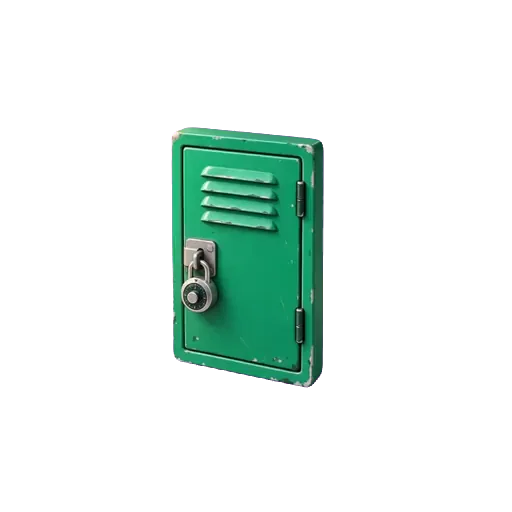
The lock can open as a filmed object: a locker, a treasure chest, a safe, and 45 objects in all. It fidgets while the class is still working and opens on video, with sound, when the answer is right, and the reveal appears inside the opened object. Filmed unlock animations come with the Event Pass or Pro. A free lock opens plainly, which is enough for a homework reveal.

How teachers use it

  1. 1

    Homework reveal

    Hide tomorrow's answer key, the next worksheet, or the reading link behind a code that is in today's homework. Students who did the work open the lock at home, on a phone, with no login.

    Play this lock: Kevin failed 4 times. Can you open the answer key? β†’
  2. 2

    Station rotation

    One lock per station, one QR code on the table. A group scans, solves, and moves to the next table. Each browser plays its own session, so a group that finishes early does not see another group's screen.

  3. 3

    Scavenger hunt

    Hide a QR code at each stop in the room, the library, or the playground. Solving one lock reveals the clue for the next stop. A chain of up to 3 steps publishes on the free plan. Longer trails use the Event Pass or Pro.

How does a multi-step escape room work?

A multi-step escape room is a chain of locks. Each right answer opens the next step, and the last one opens the finale. Nobody can skip ahead: step two stays shut until step one is solved, so a group always works on the same question. This is the ready-made three-subject template, exactly as a class plays it.

  1. Step 1Numeric code

    Maths: the egg lock

    The cupboard holds a dozen boxes of a dozen eggs πŸ₯š each.
    🍳 The canteen takes one full box for a giant omelette.

    How many eggs are left? πŸ”’ Three digits.

    βœ“ Right answer: the class sees

    Cupboard open.

    The science cupboard opens.

    Inside: a plant under a lamp, and a label whose word has been torn off.

  2. Step 2Written answer

    Biology: the plant's recipe

    This plant 🌱 makes its own food from sunlight, water and carbon dioxide, and gives out oxygen.

    πŸ€” What is this process called? ✏️ One word.

    βœ“ Right answer: the class sees

    Front page.

    Behind the pot, an old newspaper headline:

    "ONE SMALL STEP FOR MAN"

    The date has been torn off.

  3. Step 3Numeric code

    History: the torn date

    The newspaper πŸ“° tells the story of Apollo 11 πŸš€ and the first human steps on the Moon.
    They happened in the last year of the 1960s.

    Which year? πŸ”’ Four digits.

    βœ“ Right answer: the finale opens, below

FinaleHTML

The last reveal, written in HTML blocks: a headline, a ticket and a stamp, in the lock's own colours.

Three subjects, one class

The class is out.

The classroom door swings open. Every lock gave way, and you made it out together.

Well done

Write your time on the board. The next group has a record to beat.

Door open

On the free plan you can publish 3 locks, single or multi-step, of up to 3 steps each, and they never expire. The Event Pass ($7.90 for 15 days or $9.90 for 30 days, paid once) raises that to 10 locks of 10 steps and Pro removes the limit. Each step keeps its own question, lock, hint, error message and reveal.

Play the three steps β†’

Designed down to the last detail

Style every pixel of the lock, and watch it open on film.

Nothing on the screen is fixed. Pick a theme, choose a filmed object that fidgets while the lock holds and opens on video, with sound, when the code is right, then a celebration for the moment it opens. Set the typeface and size, and end on your own reveal. Your players see exactly the screen you designed.

Everything you can design on a lock β†’

Colours

51 themes, and more in the builder. Each one paints the lock, its keys and its button.

Video animations

45 filmed objects that fidget while the lock holds and open on video, with sound, when the lock gives way.

Empty rusty boxScrollRing boxEmpty puzzle boxSafePirate chestChampagne crateLockerSuitcaseMusic boxEvidence boxVault doorGift boxArcade cabinetAirlock

Typeface and size

37 typefaces and 6 text sizes, from a phone in hand to a screen across the room.

Or your own two pictures

Upload a closed and an open picture: the parcel as wrapped, then what was inside. Included with the Event Pass and Pro.

Every theme, every filmed animation, your own pictures, the celebrations, typefaces and text sizes come with the Event Pass or Pro. A basic lock keeps the default theme.

Build yours β†’
51
themes
45
filmed animations
37
typefaces
36
celebrations
15
lock types
5
player languages

Templates

Playable examples you can copy in one click. Try one first, then make it yours.

Classroom escape gameEvent Pass
Easy30 min3 steps

Classroom escape game

Three questions across three subjects, one shared screen, each answer opening the next. Built for a class of thirty with no equipment beyond the projector.

Locks used: Numeric code, Written answer

Available in: EN Β· FR Β· ES Β· CA Β· PT Β· Free to open and edit. Published with an Event Pass or Pro.

Play the example
Class quizEvent Pass
Easy15 min1 step

Class quiz

One question, one answer, the next resource behind it. The fastest way to use a lock in a lesson.

Locks used: Written answer

Available in: EN Β· FR Β· ES Β· CA Β· PT Β· Free to open and edit. Published with an Event Pass or Pro.

Play the example
Mini escape roomEvent Pass
Medium25 min3 steps

Mini escape room

Three rooms, three mechanics, one final code. The shortest complete escape game you can run in a single room.

Locks used: Numeric code, Colour sequence, Touch pattern

Available in: EN Β· FR Β· ES Β· CA Β· PT Β· Free to open and edit. Published with an Event Pass or Pro.

Play the example

More for the classroom

Questions teachers ask

Do students need a login?
No. There is no student login and no student account. Students open a link or scan a QR code and play in the browser. Only the teacher creates an account, and only to save and publish the lock.
Is this digital escape room maker free for teachers?
Yes. Classroom use with your own students is educational use, which the free plan covers. It includes 3 basic locks of up to 3 steps each, unlimited players and attempts, a QR code on every lock, and those locks never expire.
Can I share it with a QR code?
Yes. Every lock includes a downloadable QR code and a short link. Project it, print it, or send the link. The same code keeps working if you change the clue or the answer.
Do free locks include filmed unlock animations?
Filmed unlock animations, 45 filmed objects that open on video when the answer is right, come with the Event Pass or Pro. A free lock opens plainly. You can try the films in the builder's preview before you pay.
Can a whole class play at the same time?
Yes, on the free plan. Project one QR code, or let each group open the link on its own phone. Each device plays its own session, and there is no cap on players.

Create a free lock for your next lesson.

One question and one reveal is already a complete activity. The free plan holds 3 of them, and they never expire.

Create a free lock β†’